FREE ON-PAGE SEO TOOL
Free SEO Chrome Extension for Fast On-Page Audits
SEO Tog Inspector helps you check page titles, meta descriptions, heading structure, keyword usage, images and important technical SEO elements without leaving the webpage you are reviewing.
Free to install · No account required · No user tracking · Page data processed locally
Free
Install it from the Chrome Web Store.
Lightweight
Built for quick page-level checks.
Private
Analysis happens locally in your browser.
Practical
See the SEO information you actually need.
THE QUICK ANSWER
SEO Tog Inspector at a Glance
SEO Tog Inspector is a free, lightweight Chrome extension for quick webpage-level SEO checks. It brings together the on-page information you are most likely to need during a content review, basic audit or competitor check.
Tool type
Google Chrome browser extension
Price
Free
Main purpose
Fast on-page SEO analysis
Account required
No
Website compatibility
Works on webpages opened in Chrome
Main checks
Metadata, headings, keywords, images, links and supported technical page elements
Data handling
Webpage information is processed locally in your browser
Developer
The SEO Tog
Current version
Version 1.6.1
This is a page-level inspection tool rather than a full website crawler. It helps you understand what is happening on the page in front of you without pretending to replace a complete technical SEO audit.
ONE CLEAN BROWSER SIDEBAR
What Does SEO Tog Inspector Check?
The extension analyses the active webpage and organises its findings into clear, readable reports. No digging through source code and no opening five separate tools for a basic page review.
Metadata
Review the page title and meta description without opening the source code.
Heading structure
See every H1–H6 heading, its order and the overall content hierarchy.
Keyword usage
Identify frequently used words, phrases and recurring topical language.
Images
Review image details and find images with missing alternative text.
Links
See the page’s internal and external links in one convenient place.
Technical details
Locate supported page information, including robots.txt and sitemap links.
METADATA ANALYSIS
Check Page Titles and Meta Descriptions in Seconds
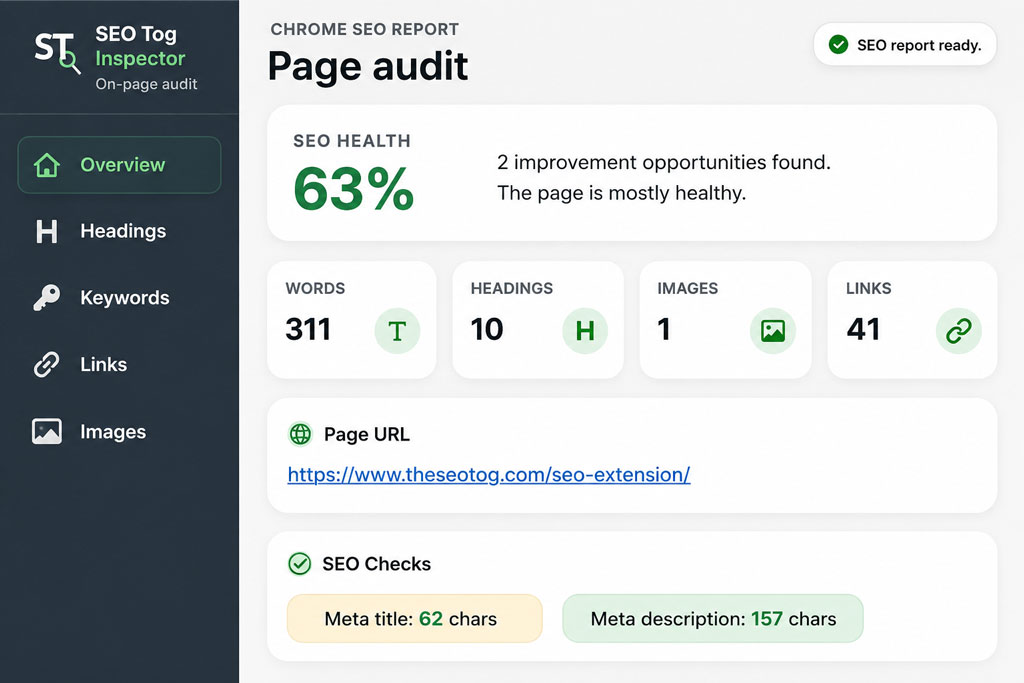
A page title and meta description are often the first SEO elements I check when reviewing a webpage. SEO Tog Inspector displays this information directly inside your browser, making it easier to spot missing metadata, vague wording and a mismatch between the search snippet and the visible page.
This is useful on your own website, but it is equally handy during competitor research. Open a competing service page, activate the extension and see how the page has been framed for search.
You are not copying another company’s title. You are looking for patterns, positioning and missed opportunities that can inform a better page of your own.
CONTENT STRUCTURE
Understand the Complete H1–H6 Heading Hierarchy
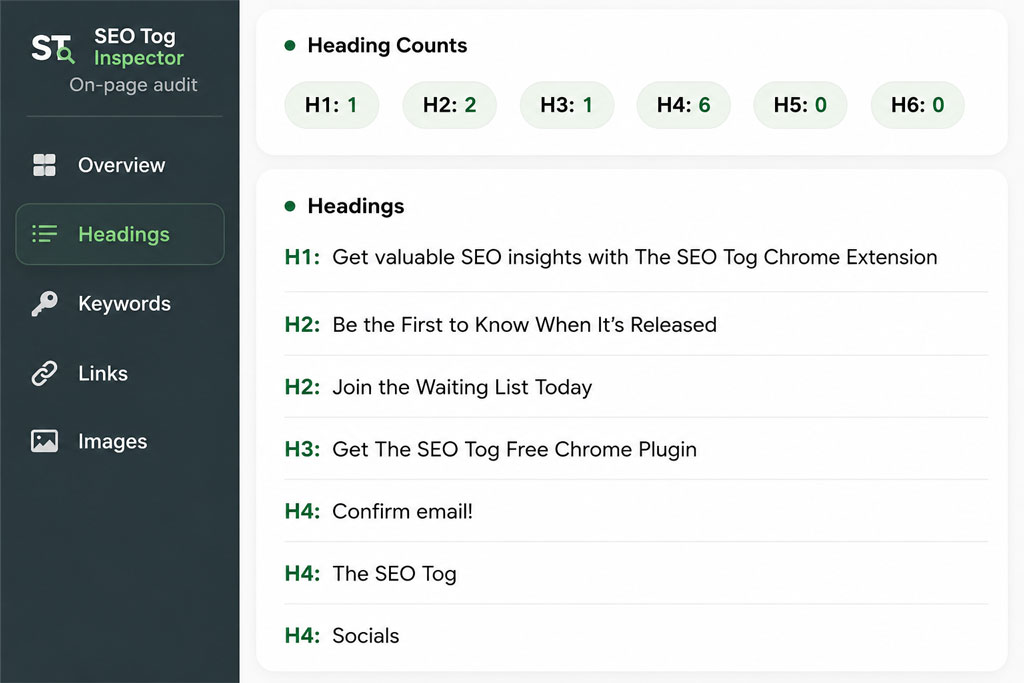
Headings help visitors scan a page and help search systems understand how its sections relate to one another. SEO Tog Inspector displays every heading found on the webpage, including the total number of each heading type.
- Find pages with no clear H1.
- Spot multiple competing main headings.
- Review the order of H2 and H3 sections.
- See how important terms are used inside headings.
- Identify sections and questions the page may be missing.
The goal is not to chase a perfectly rigid heading sequence. It is to create a structure that makes the content easier for people and search engines to understand.
TOPICAL FOCUS
See Which Words and Phrases Dominate the Page
SEO Tog Inspector analyses the words and phrases used across the visible page content. You can review frequently repeated terms, recurring two- and three-word phrases, and a visual keyword cloud.
I find this especially useful when a page looks relevant at first glance but is actually discussing several loosely connected subjects. The report can make that lack of focus much easier to spot.
- Check whether the page has a recognisable main topic.
- See which services, products and entities appear most often.
- Identify important supporting language that may be absent.
- Understand how competitors describe a similar service.
- Spot pages that have drifted into unrelated subjects.
A small warning: there is no magical keyword-density percentage. Use the data to understand topical focus—not to repeat a phrase until the copy sounds like a broken sat-nav.
IMAGES AND ACCESSIBILITY
Find Missing Image Alt Text and Image SEO Issues
Images are easy to neglect, particularly on photography, creative, ecommerce and service-business websites. SEO Tog Inspector scans the images found on the active webpage and shows how many include alternative text, how many are missing it and which image URLs need reviewing.
A photographer, for example, can review a portfolio or venue page and quickly see whether a large gallery has been uploaded without useful alt descriptions.
Alt text should explain the relevant purpose or content of an image for someone who cannot see it. It should not become a storage cupboard for every keyword you hope to rank for. Decorative images may sometimes use an empty alt attribute, while meaningful images normally need a useful description.
What the image report helps you review
- Total images detected on the page
- Images with alternative text
- Images with missing alt attributes
- Image URLs and available details
- Pages that need a closer accessibility review
QUICK TECHNICAL CHECKS
Review Links, Robots.txt and Sitemap Information
SEO Tog Inspector also surfaces supported technical information from the webpage and website you are viewing. This includes links found on the page, robots.txt information, sitemap links and other available page-level details.
These checks are useful during an initial review when you want to understand how a webpage has been put together or find important website files without manually hunting for them.
A page check is not a full site crawl
The extension gives you a fast snapshot of the active webpage. A complete audit may also need to examine indexation, redirects, canonicalisation, duplicate pages, Core Web Vitals, JavaScript rendering, crawl depth, internal-link distribution and off-page authority.
SIMPLE BY DESIGN
How to Use SEO Tog Inspector
There is no API key, complicated setup or separate dashboard to learn.
1
Install the extension
Add SEO Tog Inspector from the official Chrome Web Store.
2
Open a webpage
Visit your page, a draft or a publicly accessible competitor page.
3
Run the inspection
Open the extension and let it analyse the active webpage.
4
Prioritise the findings
Focus on issues affecting clarity, accessibility, search intent and crawlability.
BUILT FOR REAL WORKFLOWS
Who Is SEO Tog Inspector For?
Website owners
Understand the basic SEO structure of a page without learning how to inspect HTML.
Content writers
Review titles, headings, repeated phrases, topical focus and images before publishing.
SEO specialists
Carry out quick preliminary checks, content reviews and competitor research.
Photographers and creatives
Check portfolio pages, service pages and blog posts without an overwhelming dashboard.
Marketers and agencies
Review campaign pages and client content directly inside the browser.
Developers and designers
Confirm that essential on-page elements are present before a page goes live.
THE RIGHT TOOL FOR THE JOB
Why Use It Instead of a Larger SEO Platform?
SEO Tog Inspector is not trying to become another enormous all-in-one marketing suite. It is designed for the moments when you need clear page-level information quickly.
SEO Tog Inspector
- Free Chrome extension
- No account required
- Runs inside your browser
- Focuses on the active webpage
- Clean, lightweight interface
- Useful for fast checks
- Page information processed locally
Larger SEO platforms
- Often require a paid subscription
- Usually need an account
- Open in a separate platform
- Analyse entire websites and campaigns
- Offer broader, more complex dashboards
- Useful for ongoing monitoring
- May connect to external databases and accounts
Use SEO Tog Inspector when you want to inspect the page in front of you. Use a larger platform when you need rank tracking, backlinks, historical data or a complete website crawl.
MADE FROM A REAL SEO FRUSTRATION
Why I Built SEO Tog Inspector
I built SEO Tog Inspector because I was tired of opening several different tools just to check a title, heading hierarchy, repeated phrases and missing image alt text.
Sometimes you do not need a thirty-page report. You just need a clear view of what is happening on the page in front of you.
During content reviews, I regularly want to know whether the topic is obvious, whether the sections follow a logical structure, whether important terminology is present and whether the images have been reviewed properly.
I wanted those answers to be easy to find without logging into another platform or opening a collection of browser tabs. The result is a lightweight extension focused on practical information rather than metrics added simply to make a dashboard look impressive.
The questions I wanted it to answer
- Is the page’s main topic obvious?
- Does it have a clear H1?
- Do the sections follow a logical order?
- Which terms and phrases dominate the content?
- Are important images missing alt text?
- Can I quickly locate the sitemap and robots.txt?
PRIVACY AND TRANSPARENCY
How Does SEO Tog Inspector Handle Your Data?
SEO Tog Inspector analyses the webpage that is active when you choose to run the extension. It temporarily reads relevant webpage content inside your browser so it can create the SEO reports.
The extension does not collect, store, transmit or sell personal user data. Webpage information used for the analysis is processed locally and is not sent to external servers.
Privacy at a glance
- No personal user data collected or sold
- No advertising-based use of your data
- No tracking across other websites
- No webpage information sent to external servers
- No remotely hosted extension code
- Permissions limited to analysing the active webpage after activation
CURRENT RELEASE
Latest SEO Tog Inspector Update
Version 1.6.1
Chrome Web Store update: 14 May 2026
The current release includes the refreshed production interface and access to the extension’s core metadata, heading, keyword, image, link and technical page reports.
COMMON QUESTIONS
Frequently Asked Questions About SEO Tog Inspector
A few quick answers before you install it.
What is SEO Tog Inspector?
SEO Tog Inspector is a free Chrome extension for analysing important on-page SEO elements on the webpage currently open in your browser. It displays metadata, headings, keywords, phrases, image information, links and supported technical details inside a clear sidebar.
Is SEO Tog Inspector free?
Yes. SEO Tog Inspector is free to install through the official Chrome Web Store. You do not need to enter payment information or create an account to use its current features.
Do I need to create an account?
No. There is no registration or account setup. Install the extension, open the webpage you want to analyse and activate SEO Tog Inspector.
What does the extension check?
The extension reviews page titles, meta descriptions, H1–H6 headings, keyword usage, recurring phrases, keyword frequency, keyword clouds, image details, alt-text coverage, links, robots.txt and sitemap information, alongside other supported page-level elements.
Does SEO Tog Inspector collect my personal data?
No. SEO Tog Inspector does not collect, store, transmit or sell personal user data. Webpage information needed to create the report is processed locally inside your browser and is not sent to an external server.
Does it only work on WordPress websites?
No. SEO Tog Inspector is a Chrome browser extension rather than a WordPress plugin. It analyses webpages opened inside Chrome regardless of whether the site was built with WordPress, Squarespace, Wix, Shopify or another platform.
Can I use it to analyse competitor pages?
Yes. You can inspect publicly accessible webpages to understand their metadata, heading structure, recurring terminology and image optimisation. Use the findings for research and strategic insight rather than copying another website’s content.
Is this a replacement for a full SEO audit?
No. SEO Tog Inspector performs quick webpage-level checks. A full audit examines the wider website, including crawling, indexation, internal linking, duplication, performance, structured data, redirects and authority signals.
Does it guarantee higher Google rankings?
No—and I would be suspicious of any browser extension that claimed it could. Rankings depend on relevance, content quality, technical accessibility, competition, authority, search intent and many other factors. The extension helps you understand important page-level elements; it does not manufacture guaranteed rankings.
READY FOR A QUICKER PAGE CHECK?
Run Your Next On-Page SEO Audit in Seconds
Open the page you want to review, activate SEO Tog Inspector and get a clearer view of its metadata, headings, keywords, images, links and technical page elements.
Free to install. No account required.