
You can have a beautiful photography website, an impressive portfolio and years of experience—and still struggle to get found online.
I see this all the time.
The photographs are excellent. The branding looks polished. The homepage has a cinematic slideshow that probably took three evenings and a mild argument with the website builder to perfect.
But Google cannot confidently work out what type of photographer you are, where you work, which services you offer, which page should rank for each search, or why your website deserves to appear above the competition.
SEO for photographers is the process of making your website easier for search engines to crawl, understand and recommend when potential clients search for the photography services you offer.
It is not about cramming “wedding photographer” into every paragraph. It is not about turning every image filename into a small novel. And it definitely is not about getting a green light from an SEO plugin and assuming the job is done.
What actually helps a photography website rank?
Photography SEO works when Google can clearly understand:
- what you photograph,
- where you work,
- who your ideal clients are,
- what makes your service useful or different,
- and which page is the best result for a particular search.
No single plugin, image filename, word count or SEO score will rank your website on its own.
In this guide
- Why your photography website is not ranking
- How photographers should choose keywords
- Which page should target each keyword
- How to optimise photography service pages
- Image SEO for photographers
- Local SEO for photographers
- What photographers should blog about
- Internal linking
- Backlinks and authority
- Technical SEO
- AI Overviews and AI search
- How to measure photography SEO
- A practical 30-day plan
- Frequently asked questions
Start by diagnosing why your website is not ranking
Before changing title tags, publishing more blog posts or buying another SEO tool, work out what is actually holding the website back.
This is where many photographers lose months. They assume they need more content, so they publish eight rushed posts. The real problem was that their important service page was not indexed. Or they redesign the entire website because traffic is low, when five pages are actually competing for the same keyword.
1. Can Google crawl and index the important pages?
A page cannot rank if Google cannot properly access or index it.
- Check whether your main pages appear in Google Search Console.
- Look for accidental
noindexinstructions. - Make sure robots.txt is not blocking essential resources.
- Confirm canonical tags point to the correct URL.
- Review the XML sitemap and remove redirected or irrelevant pages.
- Fix broken links, redirect chains and dead ends.
- Make sure important service pages are linked from the website.

Do not assume a page is indexed simply because it exists. I have seen portfolio pages hidden from search engines, entire Showit pages accidentally assigned noindex tags and staging settings left active after launch. When the cause is unclear, a properly prioritised website audit can separate the issues that matter from the harmless warnings most tools produce.
2. Does each important search have a suitable page?
Suppose someone searches for Austin wedding photographer, London personal branding photographer, Sydney family photographer, New York proposal photographer, Manchester newborn photography or Melbourne commercial photographer. Which page on your website should Google return?
If the honest answer is “probably the homepage for all of them,” your site structure may be too vague.
Your homepage can introduce the overall business, but it cannot always satisfy every niche, service and location equally well. A wedding photographer who also offers proposals, engagement sessions and destination elopements may need separate pages for those services. A commercial photographer may need individual pages for product photography, interiors, headshots and personal branding.
3. Are several pages competing for the same search?
Keyword cannibalisation happens when multiple pages target the same or very similar intent.
- The homepage targets “wedding photographer in Melbourne”.
- An about page targets the same phrase.
- Three venue posts repeat it in every heading.
- A location page targets it again.
- Category archives use a similar title.
The problem is not that several pages discuss wedding photography. The problem is that they all try to perform the same job. A service page can target booking intent, a venue guide can answer venue-specific questions, a case study can demonstrate experience and an advice post can answer an informational query.
4. Is the website too slow or difficult to use?
Photography websites are particularly vulnerable to performance problems because their biggest selling point—the photographs—is also usually their biggest technical burden.
- full-resolution files uploaded directly from Lightroom,
- oversized hero images,
- autoplay background video,
- galleries loading hundreds of photographs,
- multiple custom fonts,
- poorly configured lazy loading,
- and animation that works on desktop but feels painfully slow on a phone.
Do not chase a perfect speed score for its own sake. Ask whether a potential client can quickly see your work, understand your offer and move through the site without waiting for every photograph you have taken since 2017 to load.
5. Does the website have enough authority and trust?
Google does not only look at what you say about yourself. It can also find supporting signals through links, reviews, business listings, professional associations, venue supplier pages, interviews, collaborations and consistent business information.
The order I normally use
- Fix crawling and indexing problems.
- Clarify what each important page is targeting.
- Improve the main service and location pages.
- Strengthen local search visibility.
- Improve image performance and page experience.
- Build useful supporting content.
- Earn relevant authority.
- Measure enquiries and refine the strategy.
There is little value in building backlinks to a confusing page, and very little joy in renaming photographs for six hours before discovering the gallery is set to noindex.
How should photographers choose SEO keywords?
Keywords are the words and phrases potential clients use when searching. Good keyword research is not simply a matter of finding the phrase with the largest search volume.
A useful photography keyword should connect your niche, target location, the searcher’s intent and a service you genuinely provide.
Service keywords
- wedding photographer
- family photographer
- maternity photography
- personal branding photographer
- corporate headshots
- product photography
- boudoir photography
- newborn photography
Service and location keywords
- Austin wedding photographer
- Bristol family photographer
- Sydney personal branding photographer
- Chicago maternity photographer
- Perth product photographer
- Edinburgh elopement photographer
Venue and destination keywords
- San Francisco City Hall wedding photographer
- Kew Gardens wedding photography
- Hunter Valley wedding photographer
- best engagement locations in Toronto
- family photo locations in Brisbane
Problem and comparison keywords
- what to wear for family photos
- how long do wedding photographs take
- how much does branding photography cost
- documentary vs editorial wedding photography
- mini session vs full family session
- personal branding photos vs corporate headshots
Search intent matters more than raw volume
Compare “photography ideas” with “Austin wedding photographer prices”. The first may attract a large, mixed audience. The second is far more likely to come from someone comparing providers.
I would rather attract 100 people looking for the exact service than 5,000 people collecting generic photography inspiration for a Pinterest board.
For a deeper process, see my photography keyword research guide, including common mistakes and ways to use phrases naturally.
Where can photographers find keyword ideas?
- Google Search Console
- Google autocomplete
- People Also Ask
- Google Keyword Planner
- Ahrefs
- Semrush
- LowFruits
- AlsoAsked
- competitor service pages
- venue websites
- enquiry forms and consultation calls
You do not need an expensive software stack to begin. These free SEO tools for photography businesses can help you research, audit and measure your site without subscribing to everything under the sun.
Which page should target each keyword?
A keyword map assigns each important search intent to the page best suited to answer it.
| Page type | Main purpose | Example |
|---|---|---|
| Homepage | Introduce the main business and market | Austin wedding photographer |
| Service page | Explain a defined service | Austin engagement photography |
| Location page | Target a genuine secondary area | Texas Hill Country wedding photographer |
| Venue article | Answer venue-specific searches | Wedding photography at The Allan House |
| Advice article | Answer client questions | What to wear for engagement photos |
| Case study | Demonstrate relevant experience | Autumn engagement session in Austin |
| About page | Establish the photographer and brand | Photographer or studio name |
| Contact page | Convert interested visitors | Check photography availability |
How to build your own keyword map
Create a spreadsheet with the current URL, page type, primary search intent, main topic, target location, supporting keywords, current clicks, current impressions, conversion goal and action required.
Then review each important page and choose one of four actions:
- Improve the page because the target is correct but the content is weak.
- Reposition the page around a different intent.
- Merge overlapping pages into one stronger resource.
- Redirect a redundant page to a more useful destination.
What does an optimised photography service page look like?
A service page needs to do more than display a gallery and say, “Get in touch for details.” Your photographs create desire. Your words remove uncertainty.
- A clear H1 naming the service and relevant market
- A short introduction explaining who the service is for
- A carefully selected portfolio
- Information about your style and approach
- An explanation of the client experience
- Relevant locations, venues or service areas
- Testimonials or other proof
- Answers to common questions
- Links to related galleries or case studies
- A clear next step
Write a clear title tag
Weak: Home | Sarah Jane Photography
Clearer: Austin Wedding Photographer | Sarah Jane Photography
Specialist service: Personal Branding Photographer in Melbourne | Studio Name
The title does not need to contain every nearby city. Its job is to describe the page accurately and encourage the right person to click.
Use one clear H1
- Austin Wedding Photographer
- London Personal Branding Photographer
- Sydney Family Photographer
- Chicago Commercial Product Photography
- Brisbane Newborn Photographer
Write for clients, not optimisation software
A useful service page answers what happens after the enquiry, what is included, how you work, where you travel, how clients should prepare and what happens if plans change.
That is a slightly different skill from keyword placement. My guide to better website copy for photographers goes deeper into voice, emotion, benefits and helping clients imagine the experience.
How do you optimise photography images for SEO?
Image SEO has three jobs: make images accessible, help search engines interpret them and stop visual content from making the website painfully slow.
Export images for their real display size
Do not upload a full-resolution gallery file when the website will display it at a fraction of that size. The correct export depends on the layout, display width, image orientation, screen density and whether the image is a hero, gallery item or thumbnail.
Compress carefully
Compression should reduce file weight without making your work look as though it was photographed through a steamed-up window.
- Lightroom export settings
- Capture One export recipes
- ShortPixel
- Imagify
- Squoosh
- TinyPNG
- image CDN services
- hosting or platform optimisation
Choose an appropriate format
- JPEG for broad compatibility and many photographic images
- WebP for efficient modern delivery
- AVIF for strong compression where correctly supported
- PNG for graphics requiring transparency
- SVG for suitable logos and simple vector graphics
Use descriptive filenames
Instead of: DSC_8462.jpg
Use: couple-walking-sydney-opera-house-wedding.jpg
Keep filenames concise and descriptive. Do not turn them into keyword stuffing.
Write alt text for accessibility first
Bride and groom walking through the gardens after their outdoor wedding ceremony.
Useful alt text example
Alt text should reflect the image’s purpose and context. It should not be treated as a hidden keyword box.
I explain the distinction with practical examples in my alt-text guide for photographers.
Place images near relevant content
Search engines can also consider the page topic, nearby headings, surrounding paragraphs, captions, structured data and links. A photograph from a Byron Bay elopement is more meaningful inside a useful Byron Bay guide than inside a gallery called “Portfolio 7.”
Make sure images can be discovered
- Image URLs should be crawlable.
- Gallery scripts should not hide important photographs.
- Lazy loading should work correctly.
- Responsive versions should be available.
- Important visual pages should have internal links.
- Image sitemaps may help when assets are otherwise difficult to discover.
How does local SEO work for photographers?
Local SEO helps photographers appear when someone searches for a service in a specific area. This is often where the strongest commercial intent lives.
Optimise your Google Business Profile
- official business name
- primary and relevant secondary categories
- contact details
- opening hours
- service areas
- business description
- services
- photographs
- website and booking links
Do not add locations or keywords to your business name unless they genuinely form part of the real name. “Jane Smith Best Affordable Sydney Wedding Photographer” is not a clever shortcut.
Keep business information consistent
Your name, address where publicly applicable, phone number and website should not contradict each other across Google Business Profile, social profiles, directories, association profiles and supplier pages.
Ask for genuine client reviews
A useful review may naturally mention the type of session, location, venue, client experience and finished photographs. Ask open questions rather than giving clients a keyword script.
Create genuinely useful local pages
A strong location page can include your experience in the area, relevant venues, original photographs, travel information, local planning advice, testimonials and related case studies.
A weak page changes “Austin” to “Dallas” while leaving everything else identical. That is not a local strategy. It is a mail merge with ambition.
What should photographers blog about?
Blogging can support SEO, but only when the content has a job. Publishing “our latest beautiful session” every week without considering search intent, internal links or client questions is unlikely to transform your visibility.
Written content helps search engines understand an image-led business. I explain why photography websites still need useful copy, but the key point is simple: your portfolio shows what the work looks like; your content explains the service, expertise and context around it.
Create content for the booking journey
Early research
- best wedding venues in Charleston
- family photo locations in Bristol
- proposal ideas in Sydney
- outdoor branding locations in Melbourne
Comparison and consideration
- documentary vs editorial wedding photography
- mini session vs full family session
- studio vs outdoor maternity photographs
- personal branding photography vs corporate headshots
Preparation
- what to wear for engagement photographs
- how to prepare children for a family session
- what to bring to a personal branding shoot
- how to plan a wedding photography timeline
Objection handling
- what happens if it rains
- what if I feel awkward in front of the camera
- can we include pets in the session
- how long does it take to receive the gallery
Proof and experience
- real wedding features
- venue case studies
- branding project breakdowns
- commercial photography case studies
- seasonal family sessions
For planning help, this collection of blog topics for different photography niches can help you build a meaningful calendar rather than stare at an empty document while reorganising Lightroom presets.
Build clusters rather than isolated posts
A wedding cluster might include the main service page, regional pages, venue guides, real wedding case studies, timeline advice, style comparisons and pricing guidance. A family cluster could include the main service, newborn and maternity pages, local guides, preparation advice and case studies.
Update before endlessly expanding
You may get better results by improving an existing article, adding original photographs, strengthening headings, merging overlapping posts or refreshing outdated sections.
When several articles are substantially similar, read my explanation of duplicate and near-duplicate content before creating another version.
How should photographers use internal links?
Internal links connect pages within your own website. They help visitors move through related content and help search engines understand which pages are important and how topics relate.
Venue guide → real wedding case study → regional wedding service → contact page
What-to-wear guide → family session example → family photography service → availability enquiry
Use descriptive anchor text that makes sense inside the sentence. Avoid filling every article with repeated exact-match anchors. One relevant contextual link is normally more useful than a footer full of forced phrases.
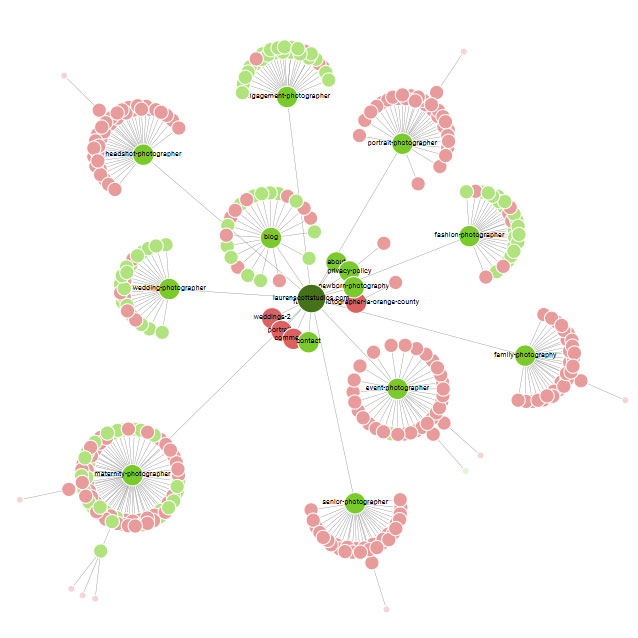
Also look for orphan pages—URLs with no internal links pointing to them. A brilliant case study will struggle to contribute much if it is floating somewhere in the website wilderness.
How can photographers earn relevant backlinks?
A backlink is a link from another website to yours. Relevant links can support discovery and authority, but they can also send direct referral traffic.
Venues and suppliers
Photographers work alongside venues, planners, florists, celebrants, makeup artists, stylists, videographers, agencies and local businesses. Real collaborations can lead to useful credits, supplier listings, case-study links and features.
Publications and features
Wedding photographers can explore wedding publications that accept submissions as a starting point. A feature is most valuable when it reaches the right audience and links to a relevant page.
Reclaim uncredited image use
When legitimate users publish your photographs without a linked credit, send a polite request asking whether they can add your name and a relevant website link.
Publish something worth referencing
- original venue guides
- local photography maps
- planning templates
- licensing advice
- pricing research
- original surveys
- useful calculators or checklists
For more practical routes, see my guide to earning relevant photographer backlinks.
What technical SEO matters most for photography websites?
Crawling and indexing
- noindex directives
- canonical tags
- redirects
- broken URLs
- XML sitemaps
- robots.txt
- orphan pages
- duplicate URL versions
To make these initial checks easier, you can join the waiting list for my free Chrome page-inspection tool. It is designed to show a page’s heading structure, metadata, commonly used phrases, robots and sitemap details, along with images that may be missing alt text. It will not replace Google Search Console or a full technical audit, but it can help you spot obvious on-page issues without digging through the source code.
Core Web Vitals
- Largest Contentful Paint relates to loading performance.
- Interaction to Next Paint relates to responsiveness.
- Cumulative Layout Shift relates to visual stability.
Photography-specific causes include an enormous hero image, a heavy gallery script and images loading without reserved dimensions.
Mobile experience
Test important pages on real phones. Check headings, buttons, galleries, forms, image crops, popups and the complete enquiry journey.
Many photographers build websites on large desktop monitors. Their clients are often browsing with one thumb while commuting, planning a wedding or trying to stop a toddler from eating something questionable.
Website platform considerations
WordPress, Squarespace, Wix, Showit, Pixieset, Format and other platforms can support successful photography websites, but they offer different levels of control.
My comparison of photography website builders covers the main strengths and limitations.
Showit users can also read my detailed Showit SEO review for platform-specific considerations.
Do not migrate a stable website simply because somebody declares another platform “best for SEO.” A poorly planned migration can cause more damage than the platform you were trying to escape.
How do AI Overviews and AI search affect photography SEO?
Potential clients can now discover businesses and information through traditional Google results, AI Overviews, AI Mode, ChatGPT, Gemini, Perplexity, Bing Copilot and other assistant-led experiences.
This does not mean you need to abandon SEO or insert mysterious “AI keywords” into every page.
Make sections easy to understand
Useful sections normally contain a clear question, a direct answer near the beginning, supporting explanation, examples, limitations and a practical next step.
Add information competitors cannot easily copy
The weakest content repeats “use keywords, optimise images, blog regularly and get backlinks.” Stronger content includes original photographs, first-hand venue knowledge, real client questions, honest pricing context, workflows, mistakes and informed opinions.
Strengthen your business and photographer entities
- photographer name
- business name
- location or genuine service area
- photography specialism
- contact details
- professional profiles
- awards or memberships
- press features
- relevant social accounts
Structured data can support understanding, but it is not a magical switch for AI visibility. It must match the information visible on the page.
How do photographers demonstrate experience and trust?
Trust is not built by adding “I am an expert photographer” six times. It is demonstrated through evidence.
- detailed portfolio work
- real client stories
- named venues and locations
- testimonials
- transparent service information
- a clear about page
- professional memberships
- media coverage
- supplier relationships
- consistent business details
Create better photography case studies
- Explain the client or project context.
- Describe the problem or goal.
- Show your creative approach.
- Add location or venue details.
- Explain important challenges and decisions.
- Present selected photographs.
- Share the result or client reaction.
- Link to the related service.
- Provide a relevant enquiry prompt.
How do you measure whether photographer SEO is working?
Rankings matter, but they are not the final goal. The real questions are whether relevant people discover the website, visit the right pages and become suitable enquiries.
Use Google Search Console
- clicks
- impressions
- click-through rate
- average position
- top queries
- top pages
- countries and devices
- image-search performance
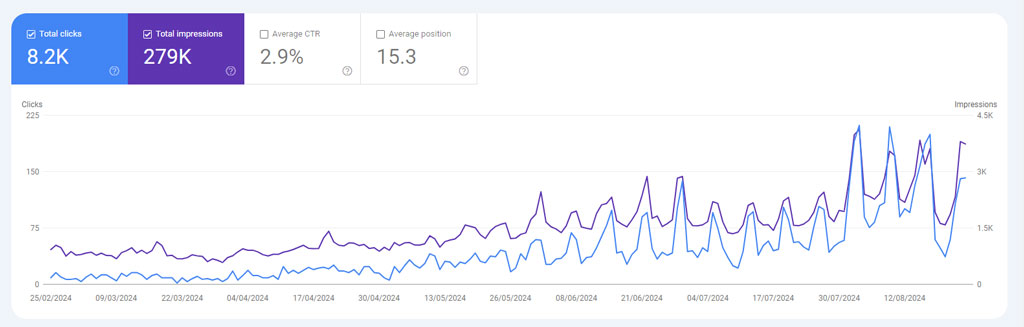
Look for pages receiving many impressions but few clicks, and for relevant pages sitting just outside stronger visibility. Improving an existing page can be more productive than starting another article.
Use analytics sensibly
- enquiry form submissions
- phone clicks
- email clicks
- booking-button clicks
- brochure downloads
- visits to key service pages
Ask how clients found you
How did you hear about me?
Attribution will never be perfect, but combining enquiry answers with Search Console, analytics and booking data gives you a better picture than watching one keyword every morning.
A practical 30-day SEO plan for photographers
You do not need to fix everything this afternoon. Use the first month to create a reliable foundation.
Week 1: Diagnose and measure
- Set up or review Google Search Console.
- Check whether important pages are indexed.
- Review the XML sitemap.
- Identify broken pages and redirects.
- Record current organic traffic and enquiries.
- Choose the five most important commercial pages.
- Test those pages on mobile.
Week 2: Clarify page targeting
- Give each important page one clear purpose.
- Build a simple keyword map.
- Identify pages competing for the same intent.
- Improve page titles and main headings.
- Strengthen service-page introductions.
- Add clear internal links.
- Merge or redirect redundant content.
Week 3: Improve local and image visibility
- Review Google Business Profile.
- Check business details across major profiles.
- Ask recent clients for genuine reviews.
- Resize and compress priority images.
- Improve useful filenames and alt text.
- Test gallery and hero performance.
- Add relevant local information.
Week 4: Build content and authority
- Improve one high-potential article.
- Publish one useful case study.
- Contact relevant venues or suppliers.
- Reclaim one uncredited image use.
- Strengthen links between supporting pages.
- Review early Search Console changes.
- Plan the next 60 days.
| Main problem | First priority |
|---|---|
| Important pages are not indexed | Crawling and indexation |
| Several pages target the same search | Keyword mapping and consolidation |
| Rankings exist but clicks are low | Titles, intent and search presentation |
| Traffic grows but enquiries do not | Service-page relevance and conversion |
| Local competitors dominate | Google Business Profile and local authority |
| Galleries load slowly | Image delivery, scripts and hosting |
| Strong pages have little authority | Relevant links and external mentions |
| You do not know what is wrong | Website diagnosis and measurement |
Common photography SEO mistakes
Targeting every service and location from the homepage
One page cannot clearly represent ten niches and 25 locations equally well.
Creating copied location pages
Changing a city name does not create unique local value.
Uploading original full-resolution files
Your website is not a client-delivery gallery.
Writing alt text for search engines instead of people
Alt text is not a place to hide a keyword list.
Publishing without a content strategy
More articles do not automatically mean more authority or enquiries.
Relying entirely on an SEO plugin
Plugins help manage settings. They do not create your strategy.
Buying large quantities of unrelated backlinks
Relevance, editorial context and trust matter more than a suspicious spreadsheet containing 500 “high-authority” websites.
Changing URLs during a redesign without redirects
A beautiful redesign can lose years of accumulated visibility when migration details are ignored.
Measuring only rankings
A number-one ranking for an irrelevant phrase will not pay the studio rent.
Frequently asked questions about SEO for photographers
How long does photography SEO take?
There is no universal timeline. Progress depends on the age and history of the website, market competition, current authority, technical condition, content quality, location and available resources. Technical corrections can sometimes produce early movement, while building authority in a competitive city or niche usually takes longer.
Can photographers do SEO themselves?
Yes. Photographers can learn to research keywords, improve titles and headings, write useful service pages, compress images, create internal links, publish case studies and use Search Console. Specialist support becomes useful when traffic has dropped, a migration is planned, several pages compete or the technical cause is unclear.
How many words should a photography service page have?
There is no ideal word count. The page needs enough useful information to satisfy the search intent, explain the service and help the client decide what to do next. Write what is useful and remove what is filler.
How many photographs should be on a service page?
Use enough images to demonstrate consistency, style, variety and relevant experience. A smaller, carefully edited set often communicates more clearly and loads faster than 150 repetitive photographs.
Is blogging still useful for photographers?
Yes, when the content supports your services, locations, authority and client journey. When writing becomes the bottleneck, my content support for photography businesses turns real expertise and sessions into useful search-led pages.
Do photographers need location pages?
Location pages can be useful when you genuinely serve the area, clients search for the service there and you can provide unique local information. They become a problem when dozens of pages repeat the same text with only the place name changed.
Is WordPress better for photography SEO?
WordPress offers flexibility, but it does not rank automatically. Squarespace, Wix, Showit and other platforms can perform well when the website has sound technical foundations, useful content, clear structure, good performance and relevant authority.
Does alt text help photography SEO?
Alt text supports accessibility and can contribute to how search engines understand image content. Its main purpose is not to repeat your target keyword.
Should photographers use AI to write blog posts?
AI can help with brainstorming, outlining, editing and research organisation. It should not replace first-hand experience, original examples, local knowledge, professional judgement, photographs or brand voice.
Can SEO help photographers appear in AI search?
Yes, but inclusion is never guaranteed. The same foundations remain important: crawlable pages, clear subject matter, useful answers, original experience, consistent business information, relevant external references and strong technical SEO.
Make your photography website easier to find, understand and trust
Photography SEO is not about completing a random checklist. It is about building a website that clearly communicates what you photograph, where you work, who your services are for, what makes your approach valuable and why potential clients should trust you.
Start with the biggest obstacle. Check whether your important pages are indexed. Decide which search each page should satisfy. Improve one commercial page. Connect it to relevant supporting content. Then measure whether the work brings more suitable visitors and enquiries.
You do not need to become a full-time technical SEO specialist. You need a clear structure, useful content, properly presented images and a sensible order of operations.